Few things are as frustrating for a metal detecting enthusiast as a detector that won’t stop beeping. Instead of the satisfying chirp of a true find, you’re plagued by constant, false signals that interrupt your search and leave you digging up nothing. Whether you’re a seasoned treasure hunter or just starting, this incessant chatter can quickly dampen your spirits and send you home empty-handed. The good news is that most instances of a constantly beeping metal detector stem from common issues that you can easily diagnose and fix right at home, often without needing professional repair. This guide will walk you through the most frequent culprits behind unwanted beeping and provide simple, effective solutions to get your metal detector running silently and accurately again, helping you focus on uncovering real treasures.
Understanding Your Metal Detector: The Basics of Operation
A metal detector operates by sending out an electromagnetic field from its search coil into the ground. When this field encounters a metallic object, it creates a disturbance, which the detector’s receiver coil picks up, translating it into an audible signal—a beep. This fundamental principle allows us to locate hidden items beneath the surface. However, this sensitive process can be easily disrupted by various environmental or operational factors, leading to unwanted beeping, often referred to as false signals or chatter.
Modern metal detectors come in various types, including Very Low Frequency (VLF) and Pulse Induction (PI) models. VLF detectors are excellent for general relic hunting and coin shooting, offering good discrimination capabilities but can be more susceptible to ground mineralization. PI detectors are often preferred for highly mineralized ground, like saltwater beaches or goldfields, as they are less affected by ground conditions but typically offer less discrimination. Understanding your detector’s technology can give you insight into why it might be reacting to certain environments.
The applications of metal detectors are vast, ranging from hobbyist treasure hunting for coins, jewelry, and historical artifacts, to more serious pursuits like gold prospecting. They are also vital in security screenings, utility line locating, and industrial quality control. Regardless of its use, a well-functioning, silent detector is key to a successful and enjoyable experience, allowing you to discern genuine targets from mere noise.
Diagnosing a Beeping Metal Detector: Key Factors to Consider
When your metal detector starts to chatter uncontrollably, it’s often a cry for attention, indicating an issue with its settings, environment, or components. Identifying the root cause is the first step toward a quick and effective fix. Several critical factors can contribute to unwanted beeping, each requiring a specific diagnostic approach. By methodically checking these areas, you can pinpoint the problem and restore your detector to optimal performance.
Sensitivity Levels
|
Our Picks for the Best Metal Detector in 2026
As an Amazon Associate I earn from qualifying purchases.
|
||
| Num | Product | Action |
|---|---|---|
| 1 | PANCKY Metal Detectors for Adults Waterproof, Professional Higher Accuracy Gold Detector with LCD Display, 5 Mode, Advanced DSP Chip 10" Coil, PK0075 |

|
| 2 | GoGonova Metal Detector for Adults & Kids, Kids Metal Detector, Waterproof Metal Detectors with High Accuracy Lightweight 8" Search Coil, All Metal & Disc Modes for Junior & Youth Gold Detector |
|
| 3 | Bounty Hunter TK4 Tracker IV Metal Detector – All-Terrain Gold, Silver, Coin & Relic Finder with 8" Waterproof Coil, 3 Detection Modes – for Adults & Kids – Made in USA |
|
| 4 | Metal Detector for Adults Professional, Waterproof Pinpoint, High Accuracy Gold and Silver Detection, Underwater and Beach Use, 10'' IP68 Coil, Bigger LCD, New Advanced DSP Chip, Black |
|
| 5 | SUNPOW Metal Detector for Adults & Kids, Kids Metal Detector kit Waterproof for Gold Detecting, Stable Anti-Interference, Higher Accuracy, Bigger LCD Display, 4 Modes, 8" Search Coil, MD13 |
|
| 6 | 2026 Latest Metal Detector for Adults, Professional Waterproof & Adjustable Stem, Higher Accuracy Gold Detector with LCD, Advanced DSP Chip, 2.26 Pounds Lightweight Suitable for Beach and Backyard |
|
| 7 | SUNPOW Metal Detector for Adults Professional - High Accuracy with 12" Waterproof Coil, 2x Backlit LCD Display, Advanced DSP Chip, 5 Modes, Adjustable Length (19"-59"), Sturdy Spiral Structure -OTMD14 |
|
| 8 | PANCKY Metal Detectors for Adults Waterproof, Professional Higher Accuracy Gold Detector with LCD Display, 5 Mode, Advanced DSP Chip 10" Coil, PK0075 |
|
| 9 | DR.ÖTEK Metal Detector for Adults, Professional Metal Detectors Waterproof with 10" IP68 Coil, Larger LCD Display, High Accuracy for Gold & Silver Detection & Beach Treasure Hunting, Beginner Friendly |
|
| 10 | Professional Metal Detector for Adults,12" IP68 Waterproof Search Coil with LCD Backlight,5 Modes Gold Detector,Advanced DSP Chip&High Accuracy System for Beach/Gold Hunting |
|
One of the most common reasons for a constantly beeping metal detector is having the sensitivity set too high. While increased sensitivity can theoretically improve detection depth, it also makes your detector overly reactive to small, insignificant pieces of metal, ground mineralization, or even invisible electromagnetic interference. For beginners especially, the temptation to maximize sensitivity can lead to a frustrating experience filled with false signals. Lowering the sensitivity is often the quickest way to quiet a noisy detector, allowing you to find a balance between depth and stability.
Ground Balance
The soil beneath your feet is not always a neutral canvas; it often contains varying levels of minerals like iron, black sand, or salt, which can mimic the signals of actual metal targets. This phenomenon, known as ground mineralization, is a frequent cause of false beeping, particularly in challenging environments like wet saltwater beaches or highly mineralized inland areas. Proper ground balancing allows your detector to “ignore” these ground minerals, focusing solely on genuine metallic objects. Most detectors offer either manual or automatic ground balance features, which are crucial for stable operation.
Electromagnetic Interference (EMI)
Our modern world is saturated with electromagnetic interference (EMI), which can significantly disrupt a metal detector’s delicate electromagnetic field. Sources like power lines, cell phone towers, Wi-Fi routers, other nearby metal detectors, and even your own mobile phone can emit signals that your detector misinterprets as metal. This can lead to random, erratic beeping even when your search coil is held perfectly still in the air. Moving away from these sources or utilizing your detector’s noise cancel or frequency shift features are essential troubleshooting steps for EMI.
Equipment Condition
The physical condition of your metal detector’s components plays a vital role in its performance. Loose cables, damaged search coils, or even low battery levels can cause a detector to behave erratically. A weak battery, for instance, might not supply consistent power, leading to unstable signals or constant beeping as the detector struggles to operate. Similarly, a coil cable that isn’t securely fastened can cause electrical noise as it moves, generating false signals. Regular inspection of your equipment for wear, damage, or loose connections is crucial for preventing these issues.
Solving Your Beeping Metal Detector: Practical Solutions and Best Practices
Once you’ve identified the potential causes of your metal detector’s incessant beeping, it’s time to implement practical solutions. Many of these fixes are simple adjustments or routine maintenance tasks that you can perform quickly at home or in the field, transforming a noisy hunt into a productive one.
Adjusting Your Settings
The first line of defense against false signals often lies in your detector’s settings.
- Sensitivity: Begin by lowering your detector’s sensitivity. Start at a medium level (e.g., 50-70% of maximum) and gradually increase it only until you achieve stable operation without excessive chatter. This adjustment is particularly effective in areas with high ground mineralization or electromagnetic interference.
- Ground Balance: Perform a proper ground balance procedure. If your detector has an automatic ground balance, activate it. For manual ground balance, follow your manufacturer’s instructions, typically involving pumping the coil up and down while listening for a smooth threshold sound. Re-ground balance every 15-30 minutes, or whenever you change ground conditions.
- Discrimination: Increase your discrimination setting slightly to filter out unwanted small metal targets like foil or pull tabs, which can contribute to general chatter in trashy areas. Be cautious not to set discrimination too high, as you might miss valuable small targets.
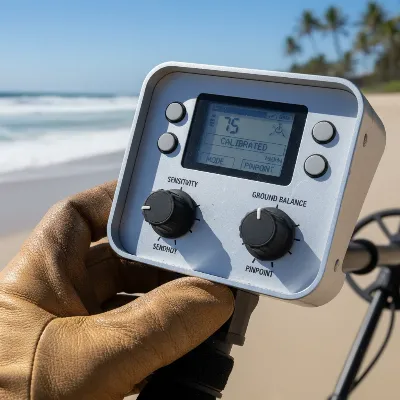 A close-up of a metal detector control panel with a hand adjusting the sensitivity and ground balance knobs, outdoor setting, clear focus on controls, realistic photo style
Mitigating Electromagnetic Interference (EMI)
Electromagnetic Interference (EMI) is a common nuisance, but there are several ways to combat it:
- Relocate: The simplest fix is to move away from known sources of EMI. This includes power lines, cell towers, Wi-Fi hotspots, buildings, and even other metal detectorists.
- Personal Electronics: Turn off or put your mobile phone into airplane mode. Keep other electronic devices like smartwatches or portable radios away from your detector.
- Noise Cancel/Frequency Shift: Many modern detectors feature a “Noise Cancel” or “Frequency Shift” function. Use this to automatically or manually shift your detector’s operating frequency to avoid conflicting signals from external sources.
- Air Test: If your detector beeps constantly when held still in the air, away from the ground and any metal objects, you are almost certainly experiencing EMI. This “air test” can help confirm the presence of interference before you even start searching.
> “70% of detector problems are actually user issues that you can fix without spending money on metal detector repair. Nine times out of ten, it’s not a detector malfunction; your machine is trying to tell you something important.” – Mike from Metal Detector Universe, Expert Detectorist
Inspecting Your Equipment
A thorough check of your detector’s physical components can reveal simple problems causing false signals:
- Batteries: Always check your battery levels. Low or weak batteries are a frequent cause of erratic behavior and constant beeping. Replace old batteries with fresh, high-quality ones, and always carry spares. Some detectors will give a low battery warning, but others may just start acting erratically.
- Cables and Connections: Ensure all cables, especially the coil cable, are securely connected and free from damage. A loose connection or a frayed cable can create electrical noise as the coil moves, resulting in false signals. Wind the coil cable snugly around the shaft, avoiding loose loops near the coil.
- Search Coil: Inspect your search coil for cracks, damage, or trapped debris. Remove the coil cover (scuff plate) and clean both sides, checking for any metallic particles (like tiny bits of foil or ironstone) trapped between the coil and the cover. These small pieces can continuously trigger false signals.
- Moisture: If you’ve been detecting in humid conditions or near water, check connectors and the control box for moisture. Disconnect and thoroughly dry any damp areas with a soft cloth or paper towel. Moisture can cause short circuits and erratic behavior.
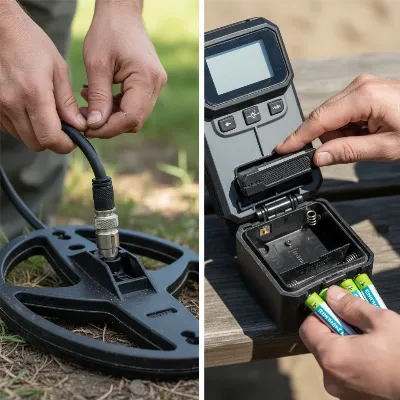 A person checking the cable connections on a metal detector's search coil and another image of them replacing batteries in the control box, hands-on, well-lit, realistic photo style
Optimizing Your Detecting Technique
Sometimes, the “problem” isn’t the detector itself, but how it’s being used.
- Swing Speed and Height: Maintain a consistent coil height and swing your detector slowly and deliberately. Erratic swinging or lifting the coil too high at the ends of your swing can cause false signals or “ghost” beeps.
- Avoid External Metal: Be mindful of any metal objects you are carrying (shovels, picks, even metal-reinforced footwear) or that are lying nearby. These can interfere with your detector’s field and cause unnecessary beeps.
- Right Coil for the Job: If you are in a highly trashy area, using a very large search coil can pick up too many targets at once, leading to a constant cacophony. Consider using a smaller coil in such environments to better pinpoint targets and reduce clutter.
Following these tips and routinely checking your equipment will significantly reduce false signals, allowing you to enjoy a more focused and successful treasure-hunting experience. A quiet detector is a happy detector, and a happy detector leads to more finds.
 A person gently cleaning a metal detector's search coil with a soft brush and damp cloth, showing attention to detail, outdoor setting, realistic photo style
Conclusion
A metal detector that won’t stop beeping can quickly turn an exciting adventure into a frustrating chore. However, by systematically addressing common culprits like incorrect sensitivity settings, ground mineralization, electromagnetic interference, and simple equipment issues, you can often restore your detector’s calm demeanor in minutes. Remember to check your batteries, secure all cable connections, perform regular ground balances, and adjust your sensitivity to suit the environment. Most false signals are not a sign of a broken machine but rather an indication that a minor adjustment or a quick inspection is needed.
With a little attention to these details, you’ll spend less time digging up trash and more time unearthing genuine historical finds and valuable treasures. A silent, responsive metal detector is your best companion in the field, helping you hear only the signals that truly matter. So, take a moment to understand what your detector is trying to tell you, apply these simple fixes, and get back to enjoying the thrill of the hunt. What hidden treasures will your now-silent metal detector help you uncover next?
Frequently Asked Questions
Why does my metal detector beep randomly even when there’s no metal?
Random beeping is often caused by electromagnetic interference (EMI) from power lines, cell phones, or Wi-Fi, high sensitivity settings, or ground mineralization. Try lowering sensitivity, performing a ground balance, moving away from electronics, or using your detector’s noise cancel feature.
Can wet sand or highly mineralized soil cause my metal detector to beep constantly?
Yes, wet sand (especially saltwater beaches) and highly mineralized soil contain conductive properties that can trigger constant beeping. Performing a proper ground balance is crucial in these conditions. Lowering sensitivity can also help reduce false signals from mineralization.
How often should I check my metal detector’s batteries?
It’s a good practice to check your batteries before every hunt and carry spares, as low power is a common cause of erratic behavior and false signals. For long-term storage, always remove batteries to prevent leakage and damage to internal components.
What should I do if my metal detector cable looks damaged?
If your coil cable appears damaged (frayed, cracked, or excessively bent), it can cause intermittent signals and false beeping. First, ensure it’s tightly connected. If damage is visible or suspected after troubleshooting other issues, contact the manufacturer or a repair specialist for advice on replacement or repair to avoid further electrical problems.
