Embarking on a treasure hunt with a metal detector is an exhilarating experience, but imagine the frustration of constant false signals or missing that elusive gold coin. The secret to maximizing your finds and minimizing wasted effort lies in one critical practice: proper calibration. A well-calibrated metal detector acts as a finely tuned instrument, distinguishing valuable targets from the mineral-rich soil and environmental interference. This comprehensive guide will walk you through the essential steps to safely and effectively calibrate your metal detector at home, transforming your detecting adventures from a guessing game into a precise art.
Metal Detector Calibration: Understanding the Basics
Calibration in metal detecting refers to the process of adjusting your device’s settings to optimize its performance in a given environment. Its primary purpose is to enable the detector to ignore naturally occurring minerals within the soil and focus solely on actual metallic targets. Without proper calibration, your detector might treat the ground itself as a massive, noisy target, masking genuine finds and leading to frustrating false signals. This precise tuning is crucial for achieving maximum detection depth, maintaining stable operation, and obtaining accurate target identification, ultimately reducing wasted time and effort.
Modern metal detectors work by emitting an electromagnetic field into the ground. When this field encounters a metallic object, it creates a secondary electromagnetic field, which the detector then senses. However, the ground itself contains various mineral components, such as iron particles, salt, and moisture, that can interfere with these signals, causing the detector to generate unwanted responses, often referred to as “ground noise.” Effective calibration allows your equipment to filter out this background noise, ensuring that only signals from legitimate metallic objects are amplified and brought to your attention. The three primary adjustments involved in this process are Ground Balance, Sensitivity, and Discrimination. Each plays a vital role in refining your detector’s ability to “see” what’s truly beneath the surface.
Essential Tools and Safety Precautions for Home Calibration
Before you begin the calibration process, gathering a few essential items and adhering to strict safety guidelines will ensure a smooth and effective setup. Your safety and the longevity of your equipment are paramount.
First and foremost, locate a “clean” testing spot. This means an area completely free from any known metal objects, underground pipes, power lines, communication towers, or even nearby buildings and cars. Electromagnetic interference (EMI) from these sources can severely skew your calibration results, leading to inaccurate settings. A quiet, open patch of ground, away from urban clutter, is ideal for establishing a reliable baseline.
Next, assemble a collection of test objects. These should include a variety of metals you expect to find or want to ignore. Common examples are coins (different denominations and metals), a gold ring, a silver item, iron nails, aluminum foil, and pull tabs. These objects will be crucial for verifying your settings after calibration, allowing you to observe how your detector responds to both desirable and undesirable targets. A small flat-blade screwdriver might also be necessary for older models with manual adjustment screws.
Safety Precautions:
- Power Off: Always ensure your metal detector is powered off before making any physical adjustments or moving to a new testing area.
- Clear the Area: Double-check that your chosen calibration spot is truly free of hidden metals or electrical interference. Remove any personal metallic items like watches, rings, or belt buckles, as these can also cause false readings.
- Wear Headphones: Using headphones during calibration provides clearer audio feedback, allowing you to discern subtle changes in tone and volume that indicate proper adjustment, especially when fine-tuning sensitivity and ground balance.
- Handle with Care: Always refer to your detector’s user manual for model-specific instructions and warnings. Avoid forcing knobs or buttons.
By preparing your workspace and observing these safety measures, you’ll create an optimal environment for accurate and secure metal detector calibration.
Step-by-Step Guide to DIY Metal Detector Calibration
Properly calibrating your metal detector involves a systematic approach to its key settings: ground balance, sensitivity, and discrimination. Each adjustment builds upon the last to create a highly responsive and accurate detecting machine.
Ground Balance Adjustment
Ground balance is arguably the most critical calibration step, as it tunes your detector to ignore the natural mineralization in the soil. Without it, the ground itself can become a source of constant signals, masking valuable targets.
Purpose: Ground balancing calibrates your metal detector to disregard naturally occurring minerals in the soil, allowing it to remain sensitive to actual treasures. This significantly improves detection depth and ensures stable operation, especially in varied terrain.
Types of Ground Balance:
- Preset: Some entry-level detectors have a fixed ground balance, suitable for general use but less adaptable.
- Automatic (Tracking): Many modern detectors feature automatic ground tracking, continuously adjusting the balance as you sweep. This is ideal for beginners and changing ground conditions.
- Manual: This method gives you the most control and is often preferred by experienced users, especially in highly mineralized or challenging soils.
How to Manually Ground Balance (Dynamic Method):
- Find a Clean Spot: As discussed, select an area free of metal and major EMI.
- Power On and Set Mode: Turn on your detector and switch it to an “All-Metal” or “Non-Discrimination” mode. This ensures all signals are heard during the balancing process.
- Set Initial Sensitivity & Threshold: Start with your sensitivity at approximately 75% of its maximum. Adjust the “threshold” control (if your detector has one) until you hear a faint, constant hum in your headphones. This hum should be barely audible.
- Perform the “Pumping” Motion: Hold your search coil parallel to the ground, about 6-8 inches above the surface. In a steady, controlled motion, slowly lower the coil until it’s just touching the ground, then raise it back to the starting height. Repeat this “pumping” motion.
- Listen and Adjust:
- If the audio volume increases as you lower the coil to the ground, your ground balance setting is too high. Rotate the Ground Balance (GB) knob (or press the minus button on digital interfaces) counter-clockwise to decrease it.
- If the audio volume increases as you raise the coil from the ground, your ground balance setting is too low. Rotate the GB knob (or press the plus button) clockwise to increase it.
- Continue pumping and adjusting until you hear minimal to no change in the audio volume as the coil moves up and down. You’ve found the “null zone,” indicating successful ground balance.
Our Picks for the Best Metal Detector in 2026As an Amazon Associate I earn from qualifying purchases.Num Product Action 1 PANCKY Metal Detectors for Adults Waterproof, Professional Higher Accuracy Gold Detector with LCD Display, 5 Mode, Advanced DSP Chip 10" Coil, PK0075 
2 Bounty Hunter TK4 Tracker IV Metal Detector – All-Terrain Gold, Silver, Coin & Relic Finder with 8" Waterproof Coil, 3 Detection Modes – for Adults & Kids – Made in USA
3 DR.ÖTEK Metal Detector for Adults, Professional Metal Detectors Waterproof with 10" IP68 Coil, Larger LCD Display, High Accuracy for Gold & Silver Detection & Beach Treasure Hunting, Beginner Friendly
4 Metal Detector for Adults Professional, Waterproof Pinpoint, High Accuracy Gold and Silver Detection, Underwater and Beach Use, 10'' IP68 Coil, Bigger LCD, New Advanced DSP Chip, Black
5 SUNPOW Metal Detector for Adults Professional - High Accuracy with 12" Waterproof Coil, 2x Backlit LCD Display, Advanced DSP Chip, 5 Modes, Adjustable Length (19"-59"), Sturdy Spiral Structure -OTMD14
6 PANCKY Metal Detectors for Adults Waterproof, Professional Higher Accuracy Gold Detector with LCD Display, 5 Mode, Advanced DSP Chip 10" Coil, PK0075
7 Professional Metal Detector for Adults,12" IP68 Waterproof Search Coil with LCD Backlight,5 Modes Gold Detector,Advanced DSP Chip&High Accuracy System for Beach/Gold Hunting
8 2026 Latest Metal Detector for Adults, Professional Waterproof & Adjustable Stem, Higher Accuracy Gold Detector with LCD, Advanced DSP Chip, 2.26 Pounds Lightweight Suitable for Beach and Backyard
9 SUNPOW Metal Detector for Adults & Kids, Kids Metal Detector kit Waterproof for Gold Detecting, Stable Anti-Interference, Higher Accuracy, Bigger LCD Display, 4 Modes, 8" Search Coil, MD13
10 GoGonova Metal Detector for Adults & Kids, Kids Metal Detector, Waterproof Metal Detectors with High Accuracy Lightweight 8" Search Coil, All Metal & Disc Modes for Junior & Youth Gold Detector
When to Ground Balance: Perform ground balancing at the beginning of each detecting session, whenever you move to a new location with different soil conditions, or if your detector starts behaving erratically with excessive false signals.
 A person performing manual ground balance on a metal detector in a grassy field, using a pumping motion.
Sensitivity Tuning
Sensitivity controls how deeply and how subtly your metal detector “listens” for signals. Finding the optimal sensitivity level is a delicate balance between detecting deeper targets and avoiding unwanted electrical interference or ground noise.
Purpose: Sensitivity determines your detector’s ability to pick up signals from metallic objects, influencing both detection depth and the size of objects it can register. Higher sensitivity can find smaller or deeper items, but also makes the detector more susceptible to interference.
How to Adjust Sensitivity:
- Start Moderate: Begin with your detector’s sensitivity set to a medium range, often around 60-70% or 70-80% of its maximum. This provides a stable baseline for most conditions.
- Increase Slowly: In a clean, quiet area (ideally after ground balancing), slowly increase the sensitivity setting.
- Listen for Noise: Pay close attention to the audio feedback. As you increase sensitivity, you might start to hear erratic beeping, static, or a general “chatter”—these are false signals caused by either EMI or increased ground noise. This is your “threshold of instability.”
- Dial Back: Once you reach the point of instability, slowly lower the sensitivity just enough for the detector to become quiet and stable again. This is your optimal sensitivity setting for the current conditions.
- Test Sweeping: With the coil at normal search height, sweep it side-to-side. If the detector remains stable without false signals, you’ve found a good balance. If it’s still noisy, reduce the sensitivity further.
Factors Affecting Sensitivity:
- Ground Mineralization: Highly mineralized soil (like red clay or wet saltwater beaches) requires lower sensitivity to prevent overwhelming false signals.
- Electromagnetic Interference (EMI): Power lines, cell phones, radio towers, and other electronic devices can cause interference. Lowering sensitivity can help mitigate this.
- Target Size and Depth: You’ll typically need higher sensitivity to detect very small objects or those buried at greater depths, but only if the environment allows for stable operation at that level.
Remember, a slightly lower, stable sensitivity is always preferable to a higher setting that causes constant false signals and frustration.
Discrimination and Notch Settings
Discrimination allows your metal detector to ignore unwanted metallic targets, such as iron nails or aluminum foil, while still alerting you to desirable items like coins, jewelry, or relics. Notch settings offer even more precise control over this filtering.
Purpose: Discrimination filters out unwanted metals by analyzing their electrical conductivity properties, helping you focus on valuable finds and avoid common trash items.
How to Adjust Discrimination:
- Use Known Targets: Gather your test objects (coins, rings, iron nails, pull tabs, foil). Lay them on the ground in a non-metallic area, spaced about a foot apart.
- Start with Low Discrimination: Turn on your detector and set the discrimination to its lowest possible setting, or select an “All-Metal” mode. Sweep the coil over each test object, noting how the detector responds (audio tone, Target ID numbers). This helps you understand your detector’s raw responses to different metals.
- Choose a Preset Mode (Optional): Many detectors offer preset modes like “Coin Mode,” “Jewelry Mode,” or “Relic Mode.” These modes automatically adjust discrimination for specific hunting goals and are a good starting point for beginners.
- Increase Discrimination Gradually: If you want to reject common trash like iron nails, slowly increase the discrimination setting. Sweep over your iron test object; when the detector no longer provides an audio signal or gives a distinct “reject” tone, you’ve reached the point where iron is being discriminated.
- Test Other Targets: Continue increasing discrimination while sweeping over other trash items (foil, pull tabs) and valuable targets (coins, gold rings). Your goal is to find a setting that rejects the trash while still clearly signaling the valuable items.
- Notch Discrimination: Some advanced detectors offer “notch” discrimination, allowing you to selectively accept or reject specific conductivity ranges on the Target ID scale. For example, you could “notch out” pull tabs while still accepting other items in a similar conductivity range, like small gold rings. Use this feature carefully, as setting it too aggressively can cause you to miss valuable targets.
Important Considerations:
- Gold vs. Trash: Small gold jewelry can sometimes have similar conductivity to aluminum foil or pull tabs. Setting discrimination too high to reject these trash items might also cause you to miss small gold.
- Historical Relics: If you’re hunting for historical relics, you might want to keep discrimination lower, as many valuable artifacts (e.g., old tools, cannonballs) are made of iron.
Practicing with your test targets and understanding their unique responses at different discrimination levels is key to mastering this setting.
Testing and Verification
After making your calibration adjustments, it’s crucial to verify their effectiveness. This phase ensures your detector is performing as expected and that you haven’t accidentally filtered out desirable targets.
- Air Test: Hold your search coil in the air, away from any ground interference. Pass each of your test objects (coins, rings, nails) in front of the coil at various distances. Listen for clear, consistent audio signals and observe the Target ID readings (if applicable). This confirms the detector can detect various metals and that the audio signals are clear.
- Ground Test (Buried Targets): This is the most realistic test. Bury your various test objects (coins, rings, iron) at different, shallow depths (e.g., 2, 4, and 6 inches) in your “clean” test area. Mark their exact locations.
- Sweep and Confirm: Sweep your now-calibrated metal detector over these buried targets.
- Does it accurately detect the desirable items (coins, rings) with clear signals and correct Target IDs?
- Does it ignore the undesirable items (iron nails) or give a clear “reject” signal?
- Are there any false signals when sweeping over areas with no buried metal?
- Note the depth at which objects are detected.
- Adjust as Needed: If you notice inconsistencies, false signals, or missed targets, return to the relevant calibration step (ground balance, sensitivity, or discrimination) and fine-tune your settings. For instance, if you’re getting too many false signals, slightly reduce sensitivity. If you’re missing deeper targets, cautiously increase sensitivity if the environment allows.
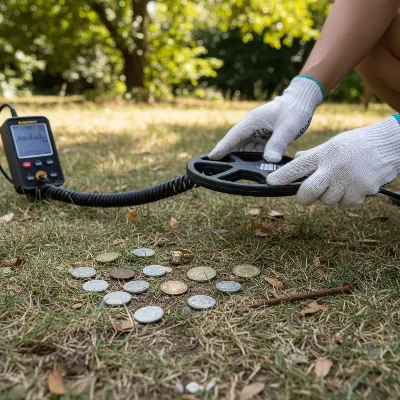 A person testing a calibrated metal detector with various metal objects laid out on the ground in an outdoor setting.
Troubleshooting Common Calibration Issues
Even with careful calibration, you might encounter issues during actual detecting. Understanding common problems and how to troubleshoot them can save you time and frustration.
False Signals: This is perhaps the most common complaint. If your detector is constantly beeping or providing erratic signals without a clear target, it often indicates an issue with sensitivity or ground balance.
- High Sensitivity: Your sensitivity might be set too high for the current ground conditions or electromagnetic interference (EMI). Try incrementally reducing the sensitivity until the false signals subside.
- Improper Ground Balance: If the ground balance isn’t properly set, the detector will pick up signals from soil minerals. Re-ground balance in the exact area where you’re experiencing issues.
- EMI: Nearby power lines, cell towers, or even other metal detectors can cause interference. Try moving to a different location or lowering your operating frequency if your detector allows it.
Poor Depth or Missed Targets: If you feel you’re not detecting objects as deeply as you should, or you’re walking over obvious targets without a signal, consider these adjustments:
- Low Sensitivity: Your sensitivity might be too low, preventing the detector from picking up faint signals from deeper or smaller objects. Cautiously increase sensitivity, ensuring stability.
- Incorrect Ground Balance: An improperly ground-balanced detector wastes processing power fighting ground noise instead of focusing on targets, significantly reducing depth. Re-balance thoroughly.
- Over-Discrimination: If your discrimination is set too high, it might be filtering out valuable targets that fall within the rejected conductivity range. Try lowering discrimination, especially if searching for small gold or relics.
Inconsistent Readings or “Chatter”: This can be frustrating, with the detector giving ambiguous or fluctuating signals.
- Changing Ground Conditions: Soil mineralization, moisture content, and even temperature can vary across a search area. Periodic re-calibration of ground balance is essential if conditions change.
- Coil Issues: Check your search coil for any damage, loose connections, or trapped debris. A damaged coil cable can also cause erratic behavior.
- Battery Levels: Low battery power can lead to inconsistent performance. Always ensure your batteries are fresh or fully charged.
When to Seek Professional Help: If you’ve diligently followed all calibration and troubleshooting steps and your detector continues to perform poorly, or if you suspect a hardware malfunction (e.g., broken screen, non-responsive buttons, persistent strange noises), it’s time to consult your detector’s manufacturer support or a certified repair technician. Do not attempt to open up or repair complex electronic components unless you are professionally qualified.
Maintaining Your Metal Detector for Optimal Performance
Proper maintenance extends the life of your metal detector and ensures it consistently performs at its best. Beyond regular calibration, routine care is essential for sustained treasure-hunting success.
Regular Checks and Recalibration:
- Pre-Hunt Checklist: Before each detecting session, quickly check all connections (coil to shaft, control box to shaft, headphone jack), ensure the search coil is securely attached, and verify battery levels.
- Situational Recalibration: While you calibrate at the start of a session, be prepared to re-adjust settings, particularly ground balance, if you move from one type of terrain to another (e.g., from dry parkland to a wet beach, or from sandy soil to mineralized clay). Significant changes in weather (like a sudden rain shower) can also alter soil conductivity and necessitate re-balancing.
- Periodic Full Review: Every few months, or after extensive use, perform a complete calibration review, going through all steps (ground balance, sensitivity, discrimination) in a controlled environment to ensure everything is still optimally tuned.
Cleaning and Storage:
- Clean After Each Use: The search coil is most exposed to dirt and debris. Use a damp cloth to wipe it clean. Avoid abrasive cleaners or strong solvents. Ensure the coil connection point is free of sand or mud.
- Inspect for Wear: Regularly check the shaft, control box, and cables for any signs of wear, cracks, or loose components. Address minor issues promptly to prevent them from escalating.
- Proper Storage: Store your metal detector in a dry, cool environment, away from direct sunlight and extreme temperatures. If storing for extended periods, remove the batteries to prevent leakage and corrosion. Many detectorists use padded cases to protect their equipment from physical damage during transport and storage.
- Cable Management: Be mindful of how cables are routed and secured. Loose cables can not only get snagged but can also cause EMI or act as an antenna, leading to false signals. Use cable clips or Velcro straps to keep them tidy and taut along the shaft.
Adopting these maintenance habits will ensure your metal detector remains a reliable and highly effective tool for years of rewarding treasure hunting.
“A well-maintained and calibrated metal detector isn’t just a tool; it’s an extension of the treasure hunter’s intuition. Ignoring its upkeep is like sending a finely tuned instrument into battle without preparation.” – John Doe, Master Metal Detector Technician.
Conclusion
Mastering the art of metal detector calibration is a transformative step for any enthusiast, moving you from merely sweeping the ground to intelligently deciphering its hidden secrets. By diligently adjusting your ground balance, fine-tuning sensitivity, and wisely setting discrimination, you equip your detector to perform with precision, enhancing its ability to uncover valuable treasures while effectively minimizing the frustration of false signals. Remember, the journey beneath the surface begins with a well-prepared tool, and proper calibration is the cornerstone of that preparation. Commit to understanding these adjustments, practice regularly in varied conditions, and always prioritize safety. With a confidently calibrated metal detector in hand, you’re not just searching; you’re truly connecting with the earth’s hidden history. Now, with your detector perfectly tuned, what forgotten stories will you unearth next?
Frequently Asked Questions
How often should I calibrate my metal detector?
You should ground balance your metal detector at the beginning of every detecting session and whenever you move to a new location with different soil conditions. Sensitivity and discrimination settings may also need minor tweaks if you encounter new types of interference or targets.
Can setting sensitivity too high be detrimental?
Yes, setting sensitivity too high can be detrimental. While it might seem like it would increase detection depth, it often leads to excessive false signals, chatter, and instability due to ground mineralization and electromagnetic interference, making it difficult to pinpoint genuine targets.
What is “ground noise” and how does calibration help?
“Ground noise” refers to the unwanted signals a metal detector picks up from naturally occurring minerals in the soil. Proper calibration, especially ground balancing, helps the detector filter out these signals, allowing it to focus on actual metallic targets and operate more stably.
Should I always use maximum discrimination settings?
No, it is generally not recommended to always use maximum discrimination. While it filters out most trash, high discrimination settings can also cause you to miss valuable targets, particularly small gold jewelry, which often has similar conductivity properties to common rejected items like aluminum foil.
Are all metal detectors calibrated the same way?
While the core principles of ground balance, sensitivity, and discrimination are common, the specific procedures for calibration can vary between metal detector models and brands. Always refer to your detector’s user manual for precise, model-specific instructions and recommendations.
