Cleaning your metal detector safely and effectively at home requires a few common tools and adherence to specific steps for each component. Regular cleaning after every hunt, especially in muddy or sandy conditions, is crucial for maintaining optimal performance, preventing damage, and extending the lifespan of your valuable equipment. This guide details the essential tools and a step-by-step process for cleaning the search coil, control box, display, shaft, and cables.
Metal Detector: Overview and the Importance of Cleanliness
A metal detector is an electronic instrument designed to detect nearby metal. Key components include a stabilizer, control box, shaft, and search coil. The search coil, which frequently contacts the ground, accumulates dirt, sand, salt, and other debris. This buildup can significantly reduce the detector’s sensitivity and depth capabilities by obscuring connectors, corroding contacts, trapping moisture, and causing false signals. Consistent, meticulous cleaning is essential to preserve functionality and ensure peak performance during every outing.
Essential Cleaning Tools and Preparations
Having the correct tools and preparing your workspace will make the cleaning process safer and more efficient for your equipment.
Gathering Your Supplies
To effectively clean a dirty metal detector, you will need:
- Soft-bristled brush: Ideal for sweeping loose dirt without scratching. An old toothbrush works well for crevices.
- Several soft cloths: Microfiber cloths are best for displays and sensitive surfaces; standard soft cloths for general wiping.
- Mild soap solution: A few drops of dish soap mixed with water for stubborn grime on the coil.
- Clean water: For rinsing and dampening cloths.
- Isopropyl alcohol: For cleaning battery compartment contacts.
- Cotton swabs: Perfect for reaching tight spots around buttons and connectors.
- Coil cover remover tool (if applicable): To carefully detach the coil cover for thorough cleaning.
Pre-Cleaning Steps
Always remove as much loose dirt as possible before any wet cleaning to prevent scratching and improve efficiency.
- Remove Loose Debris: Use a soft-bristled brush to gently sweep away dirt, mud, sand, and dust from all surfaces. Focus on crevices around buttons, display edges, and connection points. For beach detecting, thoroughly brush off salt crystals to prevent corrosion.
- Disassemble Coil Cover: If your search coil has a removable protective cover, carefully detach it. These covers often harbor significant dirt and metallic fragments that can cause false signals.
- Extend Shafts: Fully extend any telescopic shafts to easily access and clean inner sections where dirt can accumulate.
A Step-by-Step Guide to Cleaning Your Metal Detector
Once tools are ready and initial debris is removed, proceed with detailed cleaning of each component, exercising gentleness, especially with electronic parts.
Cleaning the Search Coil and Coil Cover
|
Our Picks for the Best Metal Detector in 2026
As an Amazon Associate I earn from qualifying purchases.
|
||
| Num | Product | Action |
|---|---|---|
| 1 | SUNPOW Metal Detector for Adults Professional - High Accuracy with 12" Waterproof Coil, 2x Backlit LCD Display, Advanced DSP Chip, 5 Modes, Adjustable Length (19"-59"), Sturdy Spiral Structure -OTMD14 |

|
| 2 | GoGonova Metal Detector for Adults & Kids, Kids Metal Detector, Waterproof Metal Detectors with High Accuracy Lightweight 8" Search Coil, All Metal & Disc Modes for Junior & Youth Gold Detector |
|
| 3 | SUNPOW Metal Detector for Adults & Kids, Kids Metal Detector kit Waterproof for Gold Detecting, Stable Anti-Interference, Higher Accuracy, Bigger LCD Display, 4 Modes, 8" Search Coil, MD13 |
|
| 4 | DR.ÖTEK Metal Detector for Adults, Professional Metal Detectors Waterproof with 10" IP68 Coil, Larger LCD Display, High Accuracy for Gold & Silver Detection & Beach Treasure Hunting, Beginner Friendly |
|
| 5 | Bounty Hunter TK4 Tracker IV Metal Detector – All-Terrain Gold, Silver, Coin & Relic Finder with 8" Waterproof Coil, 3 Detection Modes – for Adults & Kids – Made in USA |
|
| 6 | Metal Detector for Adults Professional, Waterproof Pinpoint, High Accuracy Gold and Silver Detection, Underwater and Beach Use, 10'' IP68 Coil, Bigger LCD, New Advanced DSP Chip, Black |
|
| 7 | Professional Metal Detector for Adults,12" IP68 Waterproof Search Coil with LCD Backlight,5 Modes Gold Detector,Advanced DSP Chip&High Accuracy System for Beach/Gold Hunting |
|
| 8 | PANCKY Metal Detectors for Adults Waterproof, Professional Higher Accuracy Gold Detector with LCD Display, 5 Mode, Advanced DSP Chip 10" Coil, PK0075 |
|
| 9 | PANCKY Metal Detectors for Adults Waterproof, Professional Higher Accuracy Gold Detector with LCD Display, 5 Mode, Advanced DSP Chip 10" Coil, PK0075 |
|
| 10 | 2026 Latest Metal Detector for Adults, Professional Waterproof & Adjustable Stem, Higher Accuracy Gold Detector with LCD, Advanced DSP Chip, 2.26 Pounds Lightweight Suitable for Beach and Backyard |
|
The search coil is the most exposed part and requires the most thorough cleaning.
- Wash the Coil and Cover: Use a damp cloth with a mild soap solution to wipe both sides of the search coil and the detached coil cover. For stubborn mud, use the soft-bristled brush with soapy water. Ensure all trapped debris, especially small metallic fragments, are removed.
- Rinse Thoroughly: Use a separate clean, damp cloth (moistened with plain water) to remove any soap residue from the coil and cover.
- Dry Completely: Air dry or meticulously dry the coil and cover with a clean, dry cloth before reassembly. Ensure no moisture remains, particularly around the coil cable entry point, to prevent water infiltration.
- Inspect for Damage: Check the coil and cover for cracks, nicks, or damage that could compromise integrity or allow moisture into internal electronics.
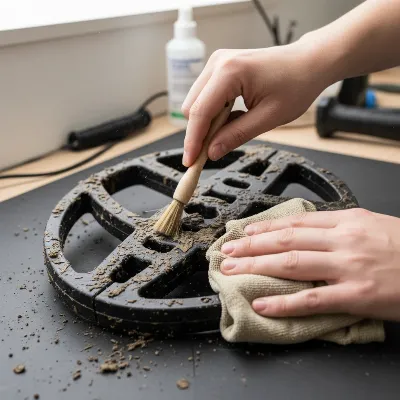 A close-up image of a person cleaning a dirty metal detector search coil with a soft brush and damp cloth, showing attention to detail.
Caring for the Control Box and Display
The control box houses sensitive electronics and is highly vulnerable to moisture, requiring extreme caution.
- Wipe Down the Control Box: Use a dry, soft cloth to wipe the entire surface. Avoid excessive moisture, as most control boxes are not waterproof and direct water contact can cause severe damage.
- Clean Around Buttons and Ports: Dip a cotton swab in a tiny amount of isopropyl alcohol or water (squeezing out excess) to carefully clean around buttons, dials, and connection ports, removing accumulated grime.
- Clean the Display Screen: Gently clean the display screen with a clean microfiber cloth. For stubborn smudges, slightly dampen the microfiber cloth with water (or a manufacturer-recommended screen cleaner), then wipe dry immediately. Never spray liquids directly onto the display.
- Battery Compartment Contacts: For removable batteries, open the compartment and inspect metal contacts for corrosion. Gently clean any corrosion with a cotton swab lightly dampened with isopropyl alcohol. Ensure contacts are completely dry before reinserting batteries or closing.
- Remove Batteries for Storage: Always remove batteries when storing your detector for extended periods to prevent leakage and corrosion, which can severely damage control box electronics.
Wiping Down the Shaft and Cables
The shaft and cables are crucial for structural integrity and functionality.
- Clean the Shaft: With shafts fully extended, wipe them down with a damp cloth to remove dirt or residue. Pay attention to locking mechanisms and connection points. Ensure all moisture is dried completely.
- Inspect Cables: Carefully inspect the coil cable and other cables for kinks, cuts, or insulation damage. Check where cables enter the coil and connect to the control box for secure, damage-free connections. Damaged cables can cause erratic signals.
- Tighten Connectors (Gently): If your detector has removable connectors, ensure they are properly attached and tightened. Avoid overtightening, especially with plastic threads, to prevent stripping.
Important Do’s and Don’ts for Metal Detector Maintenance
Following these guidelines ensures your metal detector remains in peak condition and avoids common damage.
What to Do
- Clean Regularly: Make cleaning a routine after every hunt, particularly in wet, muddy, or sandy conditions.
- Remove Loose Dirt First: Always brush off dry debris before using any liquids.
- Consult Your Manual: Refer to your metal detector’s user manual for specific cleaning instructions.
- Use Mild Cleaners: Stick to mild soap solutions for coils and isopropyl alcohol for electrical contacts.
- Ensure Complete Drying: Always ensure every part is thoroughly dry before reassembly or storage to prevent moisture damage.
- Store Properly: Keep your detector in a cool, dry place, ideally in a protective case, with batteries removed for long-term storage.
What to Avoid
- Harsh Chemicals: Never use abrasive cleaners, solvents, or harsh chemicals like bleach on any part, as these can damage plastics, rubber seals, and electronic components.
- Submerging Non-Waterproof Parts: Only submerge components if specifically rated as waterproof. Never submerge the control box unless explicitly stated in your manual.
- Spraying Liquids Directly: Avoid spraying liquids directly onto the control box, display, or electronic parts. Apply liquids to a cloth first.
- Overtightening Screws: Be careful when tightening screws, especially those holding control box halves, as plastic threads strip easily.
- Ignoring Damage: Do not ignore physical damage like cracks in the coil or control box; address them promptly to prevent moisture infiltration.
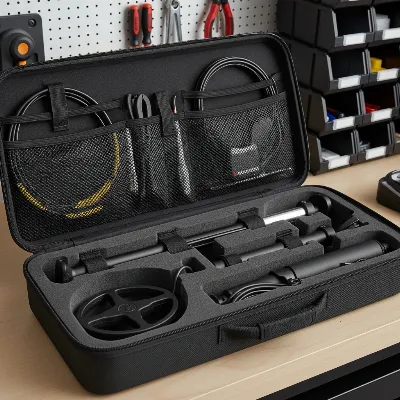 An image illustrating the proper storage of a cleaned metal detector in a protective case, emphasizing care.
Prolonging the Life of Your Detector: Storage and Beyond
Beyond cleaning, proper storage significantly impacts your metal detector’s longevity. After cleaning, ensure your detector is completely dry before storing it in a cool, dry place away from extreme temperatures and humidity. A padded carrying case offers excellent protection. Always remove batteries if storing for more than a few weeks to prevent corrosive leakage.
While most routine maintenance is DIY, professional help is needed for persistent problems, erratic signals, physical damage to the control box or internal components, water damage, or display malfunctions. Trained technicians have specialized diagnostic equipment and can perform repairs that comply with manufacturer warranties.
Conclusion
Regularly cleaning your metal detector is a simple yet vital practice that ensures optimal performance and extends its life. By brushing off loose dirt, carefully cleaning the coil with a mild solution, and gently wiping the control box with dry cloths, you protect your investment. Always remember to remove debris first, clean specific components with appropriate tools and liquids, ensure everything is completely dry, and store your detector properly with batteries removed. Incorporate these habits into your post-hunt routine to keep your metal detector unearthing exciting discoveries for years.
Frequently Asked Questions
Frequently Asked Questions
What should I do if my metal detector gets wet?
If your metal detector gets wet, immediately power it off and remove the batteries. Wipe down all external surfaces with a dry cloth. If it's a non-waterproof model and the control box was submerged, consult a professional for inspection to prevent internal damage. For waterproof models, simply wipe dry.
Can I use compressed air to clean my metal detector?
Yes, compressed air can effectively remove dirt and debris from hard-to-reach crevices around buttons, shafts, and connectors. Use it cautiously, holding the can upright to prevent propellant from spraying onto components, which could leave residue or introduce moisture.
How often should I clean my metal detector for optimal performance?
Ideally, perform a basic clean (brushing off loose dirt and wiping surfaces) after every use, especially in muddy, sandy, or wet conditions. A more thorough cleaning, including removing the coil cover and detailed wiping, should be done regularly, perhaps every few uses or once a month, depending on your detecting frequency and environments.
Is it safe to use car cleaning products on my metal detector?
It is generally best to avoid car cleaning products like Armor All on your metal detector. These products can contain chemicals that might degrade plastic or rubber seals over time, or leave a residue that attracts more dirt. Stick to mild soap and water or plain damp cloths for general cleaning to ensure safety and longevity.
My metal detector's display screen is foggy; how can I clean it safely?
For a foggy or smudged display screen, gently wipe it with a clean, dry microfiber cloth. If smudges persist, slightly dampen the microfiber cloth with plain water or a screen-safe electronic cleaner (ensure it's alcohol-free and ammonia-free), then immediately wipe dry with another clean, dry microfiber cloth. Avoid harsh chemicals or abrasive materials.
How to Safely and Effectively Clean Your Metal Detector
This guide provides step-by-step instructions for cleaning your metal detector's search coil, control box, display, shaft, and cables to maintain performance and extend its lifespan.
Gather essential cleaning supplies like a soft-bristled brush, soft cloths, mild soap solution, and isopropyl alcohol. Before any wet cleaning, use the brush to gently sweep away all loose dirt, mud, sand, and dust from all surfaces, paying close attention to crevices.
Detach the coil cover if applicable. Use a damp cloth with a mild soap solution to wipe both sides of the search coil and the detached cover. Rinse thoroughly with a clean, damp cloth and ensure both parts are completely air-dried before reassembly to prevent moisture infiltration.
Wipe the control box with a dry, soft cloth, avoiding excessive moisture as most are not waterproof. Use a cotton swab with a tiny amount of isopropyl alcohol or water to clean around buttons and ports. Gently clean the display screen with a dry microfiber cloth, or slightly damp with water for stubborn smudges, then dry immediately.
Fully extend the shafts and wipe them down with a damp cloth to remove dirt, paying attention to locking mechanisms. Inspect all cables for kinks, cuts, or damage, ensuring connections are secure. Gently tighten any removable connectors without overtightening.
After cleaning, inspect all components for any damage like cracks or nicks. Ensure the detector is completely dry before storing it in a cool, dry place, ideally in a padded carrying case. Always remove batteries for long-term storage to prevent corrosive leakage.

The advice for cleaning the control box and display was helpful, especially the part about using a microfiber cloth and avoiding harsh chemicals. However, I found the section on cleaning the cables a bit vague. I wish there were more specific instructions or a diagram for getting into those tight spots without damaging anything. Still, good overall info.
I’ve always been a bit nervous about cleaning my detector thoroughly, especially the electronic parts. The step-by-step process for the shaft and stabilizer was really clear and easy to follow. It’s great to know exactly what tools to use and what to avoid to keep my equipment in top shape. My detector looks much better now, and I feel more confident about its longevity.
This guide was exactly what I needed! I often hunt in muddy conditions, and the buildup on my search coil was starting to worry me. Following the detailed steps for cleaning it, along with the advice on regular maintenance, has made a noticeable improvement. My detector is performing much better, and I’m not seeing any more sensitivity issues. Highly recommend these cleaning tips.
I used to just wipe down my detector, but after reading about how important it is to clean the search coil properly, I gave it a real scrub. The guide’s tips on using a soft brush and mild soap for the coil made a huge difference. My detector feels like new, and I swear I’m getting better depth now. Definitely worth the extra few minutes after each hunt.