Your metal detector is falsing due to overly high sensitivity settings, mineralized ground, electromagnetic interference (EMI), loose cable connections, low battery power, or improper coil control. This common issue generates ghost signals, leading to unnecessary digging and frustration for treasure hunters. Understanding these core reasons allows detectorists to apply specific DIY fixes to quiet their machine and improve their success rate in finding genuine targets.
Understanding Metal Detector Falsing: What Causes Those Pesky Signals?
Metal detector falsing occurs when your device generates an audio signal or visual indication of a target, but no actual metallic object is present. Instead, the detector is reacting to something other than a legitimate find, leading to unnecessary digging and frustration. This can manifest as erratic beeping, chattering, or inconsistent target IDs. Identifying the root cause is crucial for applying the correct solution. Generally, these false signals stem from environmental factors, issues with the equipment itself, or even the way you operate your detector.
The impact of falsing extends beyond wasted effort. It can mask real, valuable targets, making it harder to distinguish between trash and treasure. A quiet, stable detector is a confident detector, allowing you to focus on subtle, promising signals that might otherwise be drowned out by false alarms. Many experienced detectorists agree that mastering your machine’s behavior, including how to handle falsing, is as important as knowing where to hunt.
The Core Reasons Your Metal Detector Gives False Alarms
False signals are often a symptom of your metal detector struggling to interpret its environment or experiencing an internal technical glitch. Recognizing the specific cause is key to implementing an effective solution.
Overly High Sensitivity
One of the most common culprits behind a chattering metal detector is an overly ambitious sensitivity setting. While high sensitivity increases your detector’s depth and ability to pick up smaller targets, it also makes it more susceptible to ground mineralization and electromagnetic interference. Running your machine “too hot” means it’s listening to every whisper in the ground, rather than just the shouts of legitimate metal. This can lead to your detector constantly beeping, even when there’s nothing there.
Mineralized Ground and “Hot Rocks”
Many soils contain naturally occurring minerals, particularly iron oxides, black sand, or salts, which can create their own magnetic fields. Your metal detector interprets these mineralized areas or “hot rocks” (rocks with high mineral content) as potential metallic targets. Without proper ground balancing, your detector won’t know how to ignore these natural interferences, resulting in a continuous stream of false signals as you sweep across them. This is especially prevalent in certain geological regions or on saltwater beaches.
Electromagnetic Interference (EMI)
|
Our Picks for the Best Metal Detector in 2026
As an Amazon Associate I earn from qualifying purchases.
|
||
| Num | Product | Action |
|---|---|---|
| 1 | Metal Detector for Adults Professional, Waterproof Pinpoint, High Accuracy Gold and Silver Detection, Underwater and Beach Use, 10'' IP68 Coil, Bigger LCD, New Advanced DSP Chip, Black |

|
| 2 | Bounty Hunter TK4 Tracker IV Metal Detector – All-Terrain Gold, Silver, Coin & Relic Finder with 8" Waterproof Coil, 3 Detection Modes – for Adults & Kids – Made in USA |
|
| 3 | SUNPOW Metal Detector for Adults Professional - High Accuracy with 12" Waterproof Coil, 2x Backlit LCD Display, Advanced DSP Chip, 5 Modes, Adjustable Length (19"-59"), Sturdy Spiral Structure -OTMD14 |
|
| 4 | SUNPOW Metal Detector for Adults & Kids, Kids Metal Detector kit Waterproof for Gold Detecting, Stable Anti-Interference, Higher Accuracy, Bigger LCD Display, 4 Modes, 8" Search Coil, MD13 |
|
| 5 | PANCKY Metal Detectors for Adults Waterproof, Professional Higher Accuracy Gold Detector with LCD Display, 5 Mode, Advanced DSP Chip 10" Coil, PK0075 |
|
| 6 | GoGonova Metal Detector for Adults & Kids, Kids Metal Detector, Waterproof Metal Detectors with High Accuracy Lightweight 8" Search Coil, All Metal & Disc Modes for Junior & Youth Gold Detector |
|
| 7 | Professional Metal Detector for Adults,12" IP68 Waterproof Search Coil with LCD Backlight,5 Modes Gold Detector,Advanced DSP Chip&High Accuracy System for Beach/Gold Hunting |
|
| 8 | DR.ÖTEK Metal Detector for Adults, Professional Metal Detectors Waterproof with 10" IP68 Coil, Larger LCD Display, High Accuracy for Gold & Silver Detection & Beach Treasure Hunting, Beginner Friendly |
|
| 9 | 2026 Latest Metal Detector for Adults, Professional Waterproof & Adjustable Stem, Higher Accuracy Gold Detector with LCD, Advanced DSP Chip, 2.26 Pounds Lightweight Suitable for Beach and Backyard |
|
| 10 | PANCKY Metal Detectors for Adults Waterproof, Professional Higher Accuracy Gold Detector with LCD Display, 5 Mode, Advanced DSP Chip 10" Coil, PK0075 |
|
Our modern world is saturated with electromagnetic fields, and your metal detector is highly sensitive to them. Sources of EMI can be both natural (like solar flares) and man-made. Overhead power lines, underground electrical cables, cell phones, Wi-Fi routers, radio transmitters, other metal detectors, and even nearby machinery can emit electromagnetic signals that interfere with your detector’s operating frequency. This interference can cause your machine to chatter erratically, produce garbled sounds, or give false positive readings.
Loose Connections and Damaged Cables
The search coil and its connecting cable are vital components of your metal detector. If the coil cable is loose, poorly wound around the shaft, or has internal damage, movement during your swing can cause intermittent electrical signals. These erratic signals are often interpreted by the detector as a target, leading to falsing. Similarly, a loose connection where the coil cable plugs into the control box can also introduce instability and false alarms. Even minor wear and tear on the cable’s insulation can expose wires to moisture or external interference.
Low Battery Power
A simple yet frequently overlooked cause of metal detector falsing is low or weak batteries. As your detector’s power supply dwindles, its performance can become erratic and unstable. This often manifests as inconsistent signals, a fluctuating threshold, or an increased susceptibility to ground noise and EMI. Many detectors will exhibit strange behavior, including false beeps, before completely shutting down due to depleted batteries.
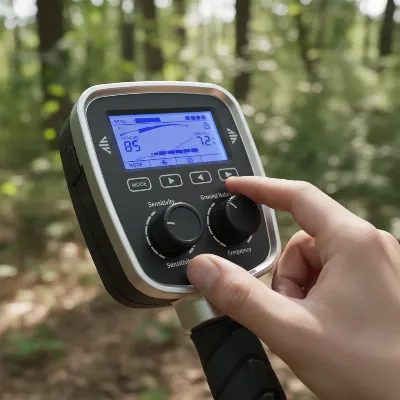 A metal detector displaying sensitivity and ground balance settings with a hand adjusting them
Improper Technique and Coil Issues
Sometimes, the “falsing” isn’t due to the detector itself, but rather how it’s being handled. Swinging the search coil too quickly, lifting it too high at the ends of your swing, or bumping it against obstacles can create temporary disruptions in its electromagnetic field, triggering false signals. Unseen issues like tiny metallic debris trapped under a coil cover (skid plate) can also cause your detector to react as if a target is present, leading to fruitless digging. Even walking with metal in your shoes can sometimes trigger falsing, particularly if the coil is close to your feet.
Your DIY Toolkit: 5 Quick Fixes to Stop Metal Detector Falsing
Don’t let false signals ruin your metal detecting experience. Most causes of falsing can be remedied with a few straightforward adjustments and a bit of attention to your equipment and technique.
Fix 1: Optimize Sensitivity and Ground Balance Settings
This is often the first and most effective step. If your detector is chattering, try gradually reducing its sensitivity. Find the highest stable setting where the detector runs quietly without constant false signals. For ground balance, this setting tunes your detector to ignore the natural mineralization in the soil.
- For Automatic Ground Balance: Move to a spot you know is free of metal (use a pinpointer to confirm). Activate your detector’s automatic ground balance function and pump the coil up and down a few inches from the ground, following your machine’s specific instructions. The detector will calibrate itself to the soil.
- For Manual Ground Balance: In a metal-free spot, pump the coil up and down while slowly adjusting the ground balance control until the audio response remains consistent, regardless of the coil’s distance from the ground. This “null zone” indicates optimal calibration. Re-ground balance frequently, especially when moving to new areas or if ground conditions change (e.g., from dry to wet).
Fix 2: Mitigate Electromagnetic Interference
EMI is an invisible nuisance, but you can take steps to reduce its impact.
- Relocate: If your detector is constantly noisy, move away from obvious sources like power lines, cell towers, buildings, and other electronic devices. Try hunting in a different direction to see if the interference diminishes.
- Silence Electronics: Turn off or move any personal electronic devices like mobile phones, smartwatches, or Bluetooth headphones away from your detector.
- Frequency Shift/Noise Cancel: Many modern metal detectors have a “frequency shift” or “noise cancel” function. This allows you to slightly change the detector’s operating frequency to avoid interference from other sources. Engage this feature to find the quietest channel.
- Minimize Other Detectors: If detecting with others, maintain a sufficient distance (often 10-20 feet) between machines, as their electromagnetic fields can interfere with each other.
Fix 3: Inspect and Secure All Cable Connections
A loose connection is a quick path to false signals. Regularly check the integrity of your coil cable and connections.
- Tighten Coil Cable: Ensure the coil cable is securely wrapped around the lower and upper shafts of your detector and that the connector is firmly screwed into the control box. A loose or damaged cable can generate false signals as it moves. Avoid tight bends or kinks in the cable.
- Check Battery Contacts: Open the battery compartment and inspect the contacts for dirt, corrosion, or looseness. Clean them gently with a dry cloth or a pencil eraser if needed to ensure a solid electrical connection.
Fix 4: Ensure Fresh and Fully Charged Batteries
Don’t underestimate the impact of your power source.
- Replace Batteries: If your detector is exhibiting erratic behavior, replace old batteries with a fresh set of high-quality ones. Always carry spare batteries, especially for longer hunts.
- Recharge: For rechargeable models, ensure your battery pack is fully charged before each outing. A partially charged battery can lead to instability.
> “Many detectorists overlook the simple stuff first. Before blaming the machine or the ground, always check your battery levels and cable connections. You’d be surprised how often that’s the real issue!” – John Smith, Senior Metal Detecting Technician
Fix 5: Refine Your Coil Control and Maintenance
Your technique and how you care for your equipment play a significant role in preventing falsing.
- Consistent Coil Control: Practice sweeping the coil at a consistent height, just above the ground, and maintain an even swing speed. Avoid lifting the coil at the ends of your sweep or bumping it against weeds, roots, or the ground. Smooth, overlapping swings are key.
- Clean Your Coil Cover: Remove the coil cover (skid plate) periodically and clean out any trapped dirt, sand, or tiny metallic particles (like hot rocks or iron fragments). These can cause continuous false signals if lodged between the coil and the cover.
- Awareness of Personal Items: Be mindful of metal items on your person, such as buckles, rings, watches, or metal in your footwear, especially if the coil is passing close to them. Sometimes, even a pinpointer carried too close to the coil can cause interference.
 A person demonstrating proper metal detecting technique with smooth coil swing
Conclusion
Encountering false signals while metal detecting can be a significant setback, but it’s a challenge that can almost always be overcome with the right approach. By understanding the common culprits—from high sensitivity and ground mineralization to electromagnetic interference, loose connections, and low batteries—you empower yourself to diagnose and fix the problem. Implementing these five quick DIY fixes, including optimizing your settings, mitigating EMI, securing your equipment, ensuring adequate power, and refining your technique, will dramatically improve your detector’s stability and your overall success rate. Don’t let a noisy machine deter you; a quiet detector means more legitimate finds and a more enjoyable treasure hunting experience. What’s the most surprising “false signal” cause you’ve ever encountered while detecting?
Frequently Asked Questions
Why does my metal detector make constant noise?
Constant noise, often called “chatter,” typically stems from high sensitivity settings, strong ground mineralization, or electromagnetic interference (EMI) from external sources like power lines or other electronics. It can also be caused by loose coil connections or low battery power. Adjusting sensitivity, ground balance, and moving away from interference are common solutions to quiet your detector.
Can weather conditions affect my metal detector’s performance?
Yes, weather conditions can impact metal detector performance. Highly mineralized ground, especially when wet (like after rain or near saltwater), can increase false signals. Lightning storms can also cause significant electromagnetic interference. Some extreme temperature changes might also subtly affect electronic components, though this is less common than ground conditions or EMI.
How can I tell if my coil cable is causing falsing?
To check if your coil cable is causing falsing, hold your detector still with the coil in the air and listen for stability. Then, gently wiggle the coil cable along its length and near its connections to the coil and control box. If the detector produces erratic signals or chattering when the cable is moved, it strongly suggests a loose connection or internal cable damage.

Great advice on dealing with mineralized ground. I always thought my machine was broken when I was searching near the beach. Lowering the sensitivity really helped quiet things down. I still get a few false signals, but it’s way better than before. Definitely worth trying these fixes.
The suggestions about checking cable connections were okay, but I found my issue was actually a faulty coil that needed replacing. While the tips were helpful for general troubleshooting, they didn’t quite solve my specific problem. It’s a good starting point for beginners though.
I was about to give up on my new detector because of all the erratic beeping. The part about low battery power being a cause for falsing was something I hadn’t even considered. Swapped out my old batteries for fresh ones, and boom, quiet as a mouse! Thanks for saving me a lot of headaches and unnecessary digging.
I was getting so frustrated with my detector chattering constantly, especially near power lines. The tip about electromagnetic interference was a game-changer for me. I adjusted my settings and moved to a different spot, and it made a huge difference. Finally, I can focus on actual targets instead of ghost signals!